Colour spaces and blending
The sRGB transfer curve, linear light and Oklab, and what each one does to a colour halfway between two others.
7 minutes read
1368 words
Contents12
Three ways to take a colour halfway between two others, and what each one costs.
A colour halfway between two others depends on the space the halving happens in. Averaging the bytes a file stores gives one colour. Averaging the light those bytes stand for gives another, and averaging in a space built to match perception gives a third. This page defines the three spaces, gives the transforms between them, and measures the midpoint each produces for one pair of colours.
Assumed knowledge
Arithmetic on vectors and a three by three matrix product. Powers and cube roots. Nothing about colour.
Ground covered
An sRGB channel and the curve that relates it to light. Relative luminance. The Oklab coordinates , and , and the transform to and from them. The midpoint of a blend in each space, measured.
sRGB channel
An image file stores three numbers per pixel, one for red, one for green, one for blue. Each is an integer from 0 to 255. Each stands for a curved function of the light a display emits. The curve spaces the 256 available steps roughly evenly to the eye, which spreads them unevenly in light.
Write for a stored channel divided by 255, so runs from 0 to 1. The light the channel stands for is , also from 0 to 1, and the sRGB standard relates them by
The two branches meet at . The lower branch is a straight line through the origin, which keeps the slope finite at zero. The upper branch is close to .1 A channel of gives .
Half of the stored range is a fifth of the light.
Linear light
Doubling one of the values doubles the light it stands for. Physical mixing is addition in , so two lamps of equal output give .
Relative luminance is the weighted sum of the three linear channels that matches how bright the eye finds the result. The weights come from the sRGB primaries.1
Green carries most of the weight and blue carries least. A pure blue at full strength has . A pure green at full strength has , nearly ten times as much.
Byte blending and its midpoint
Blending two colours by interpolating their stored bytes is the arithmetic a program performs when it treats the three integers as a vector. For colours and and a fraction from 0 to 1, each channel is .
The figure below blends , a saturated blue, with , a saturated orange. The top strip interpolates the stored bytes. The plot beneath gives the relative luminance of all three strips, with a dashed line at the average of the two ends, .
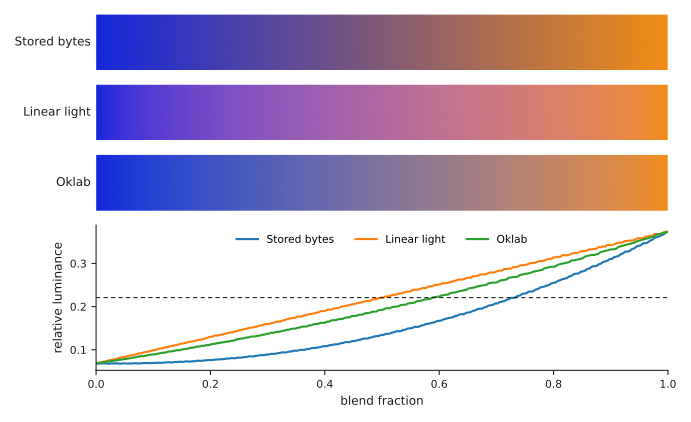
The byte blend reaches at its midpoint, against for the average of the ends. The midpoint is darker than either colour it sits between. Equation (1) is the reason. The interpolation happens in , the sum of two curved values is not the curve of their sum, and the curve bends downwards.
Linear blending and its midpoint
Applying equation (1) first, interpolating , then inverting equation (1) gives a blend in linear light. Its midpoint is against the ends average of , so relative luminance is held almost exactly.
The midpoint colour is . Its chroma, the difference between the largest and smallest of its three channels, is 72. The two ends have chroma 200 and 220. The blend passes through a colour far less saturated than either end, because a straight path between two opposite hues passes near the grey axis.
Oklab
Björn Ottosson built Oklab so that the Euclidean distance between two colours matches how different they look.2 It has three coordinates. The first, , is lightness. The other two, and , place the hue and how far it sits from grey.
The transform starts from linear light. Write , , for the linear channels of equation (1). The first step is a matrix product into three values named for the three cone types of the eye.
The second step takes the cube root of each, then a second matrix product.
The cube root is the step that makes the space perceptual. Response to light grows roughly as its cube root, so taking the cube root turns a physical quantity into one that tracks the response.
Both matrices are invertible, so the transform runs backwards. Cube the three values, apply the inverse of the matrix in equation (3), then invert equation (1) to reach stored bytes.
Blending in Oklab
Applying equations (1), (3) and (4), interpolating , and , then running the transform backwards gives the third strip. The midpoint of the blue and orange is , with and chroma 42.
That luminance sits between the byte blend’s and the linear blend’s . Oklab is not the space that preserves luminance. Linear light is, and equation (2) is a statement about linear light.
What Oklab gives is even spacing. Take 256 samples along a blend, measure the Oklab distance between each consecutive pair, and divide the standard deviation of those distances by their mean. A path whose steps all look the same size scores zero.
| Blend space | Midpoint luminance | Midpoint chroma | Step spread |
|---|---|---|---|
| Stored bytes | 0.1341 | 40 | 0.1352 |
| Linear light | 0.2206 | 72 | 0.2962 |
| Oklab | 0.1928 | 42 | 0.0000 |
Oklab scores zero by construction. A straight line in Oklab has steps of equal length, and equal length there is equal apparent difference. The other two spaces bend that line. A viewer then sees the colour change quickly through part of the blend and slowly through the rest.
The step spread is measured on the continuous path, before rounding to whole bytes. Rounding adds a step-to-step variation of its own. At 256 samples that variation is large enough to hide the difference being measured.
Choice of space
Blending in stored bytes darkens the middle of a blend. The measurement above puts the midpoint at 61 percent of the luminance the two ends average to.
Blending in linear light holds luminance. It suits a result standing for light that is physically added, as when two sources illuminate one surface.
Blending in Oklab holds the apparent rate of change constant. It suits a blend a viewer watches over time, where an uneven rate shows as the colour speeding up and slowing down.
Figure sources
One script draws the figure and prints every number this page quotes, including the table. It evaluates equations (1) through (4) directly, so a wrong coefficient changes the printout as well as the picture. It needs NumPy and Matplotlib.
uv run --with numpy --with matplotlib python3 colour-spaces.py
Further reading
The sRGB transfer curve, its two branches and the luminance weights of equation (2).1
Ottosson’s derivation of Oklab, the matrices of equations (3) and (4), and the data he fitted them to.2
References
-
sRGB. Wikipedia. Retrieved 7 September 2026. https://en.wikipedia.org/wiki/SRGB (opens in a new tab) ↩︎ ↩︎ ↩︎
-
Ottosson, B. A perceptual color space for image processing. 23 December 2020. https://bottosson.github.io/posts/oklab/ (opens in a new tab) ↩︎ ↩︎